
How to Sell Digital Products: A Step-by-Step Guide
October 7, 2026
A digital product is something you make once and sell again and again: a guide, a template, a set of presets, a planner, a recorded workshop. There is no stock to keep and nothing to post, and every sale after the first costs you almost nothing.
This guide walks through selling your first one, from choosing what to make to getting the first sale, in seven steps. It is written for creators who already have an audience on Instagram, TikTok, YouTube or a newsletter, however small.
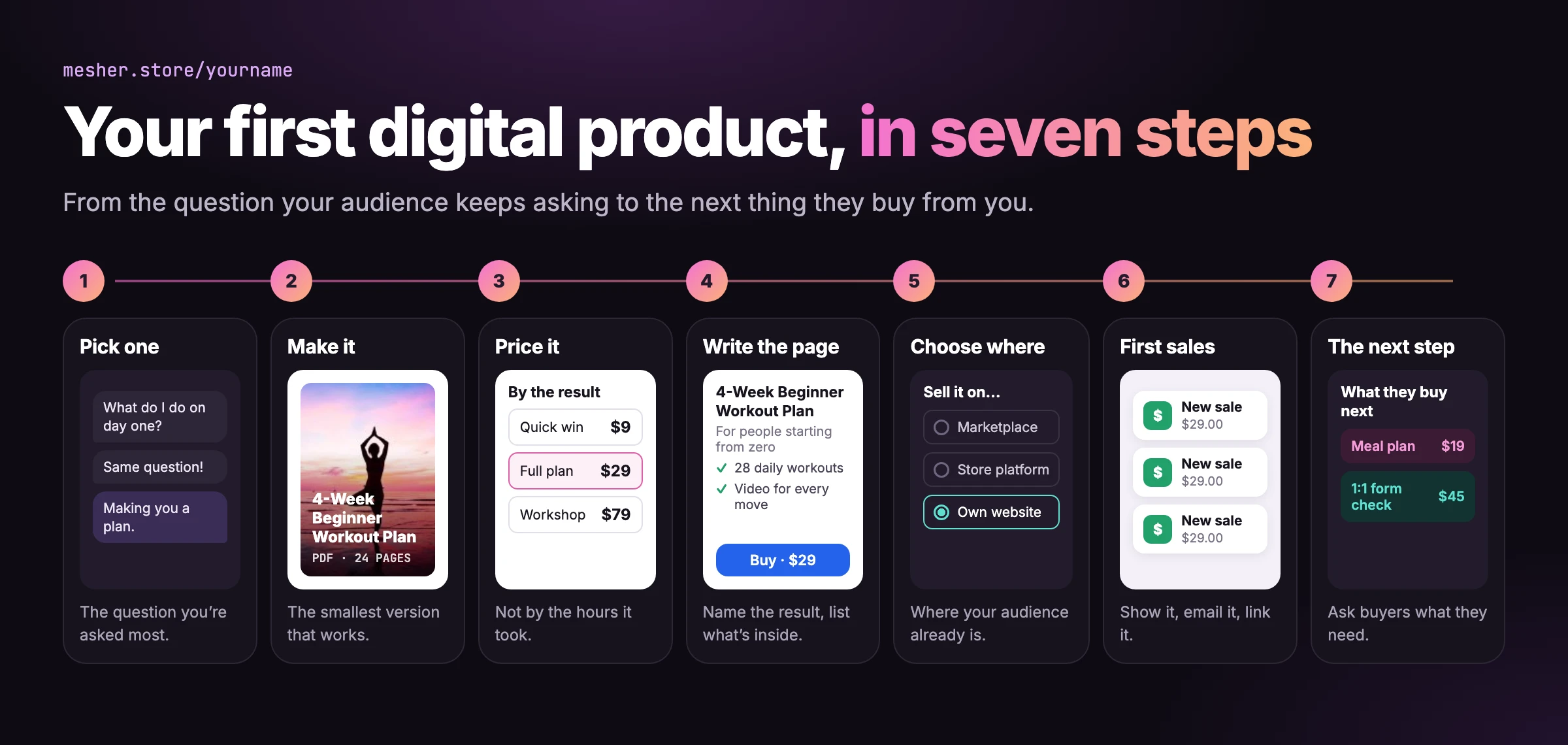
The seven steps at a glance
What counts as a digital product
Anything a buyer can download and use without you:
Guides and e-books: a step-by-step PDF, a recipe book, a study guide.
Templates: a budget spreadsheet, a Notion workspace, a set of Canva designs, a contract.
Presets and assets: Lightroom presets, fonts, sample loops, mockups.
Planners and printables: a meal planner, a habit tracker, wall art.
Recorded video or audio: a workshop, a course in a few lessons, a guided meditation.
For more, see our digital product ideas and the most profitable digital products.
1. Pick one product
The best first product answers a question your audience already asks you. Read your comments and DMs from the last month: the question that keeps coming back is the product. A fitness creator asked “what should I do on day one?” sells a 4-week beginner plan. A designer asked “which fonts do you use?” sells a pack of templates.
Start with one. A single product that solves one problem sells better than a shop of ten half-finished ones, and it is easier to explain in a post.
2. Make it
Make the smallest version that fully solves the problem. A ten-page guide that gets someone to their first result is worth more to them than a hundred pages they never finish.
Product | Made with |
|---|---|
Guide or e-book | Google Docs, Word or Canva, exported as a PDF or EPUB |
Spreadsheet template | Google Sheets or Excel, shared as an XLSX file |
Notion template | Notion, delivered as a duplicate link inside a PDF |
Canva templates | Canva, delivered as template links inside a PDF |
Presets or assets | Lightroom or your own tools, bundled in a ZIP file |
Video or audio | Your phone or a screen recorder, as an MP4 or MP3 |
Before you sell it, give it to two or three people from your audience for free and watch where they get stuck. Fix that, and you have a better product and your first reviews.
3. Price it
Most creators charge too little. Price by what the product saves or earns the buyer, not by how long it took you to make.
Small and quick: a checklist pack, a few presets or a single template, usually under $20.
The full solution: a complete guide, a planner system or a template set, often $20 to $60.
Deep work: a recorded workshop or a course, from $60 up.
If you are unsure, start in the middle of your range. It is easier to raise a price after the first sales than to explain a cut.
4. Write the product page
The page sells the product, so it answers the questions a buyer has before they pay:
A title that names the result: “The 4-Week Beginner Workout Plan” instead of “My Fitness Guide”.
Who it is for: one sentence, so the right people know it is theirs.
What is inside: the pages, the templates, the lessons, listed.
A picture of it: the cover, a page spread or the template in use.
What they get after paying: “Instant download: a 24-page PDF.”
5. Choose where to sell it
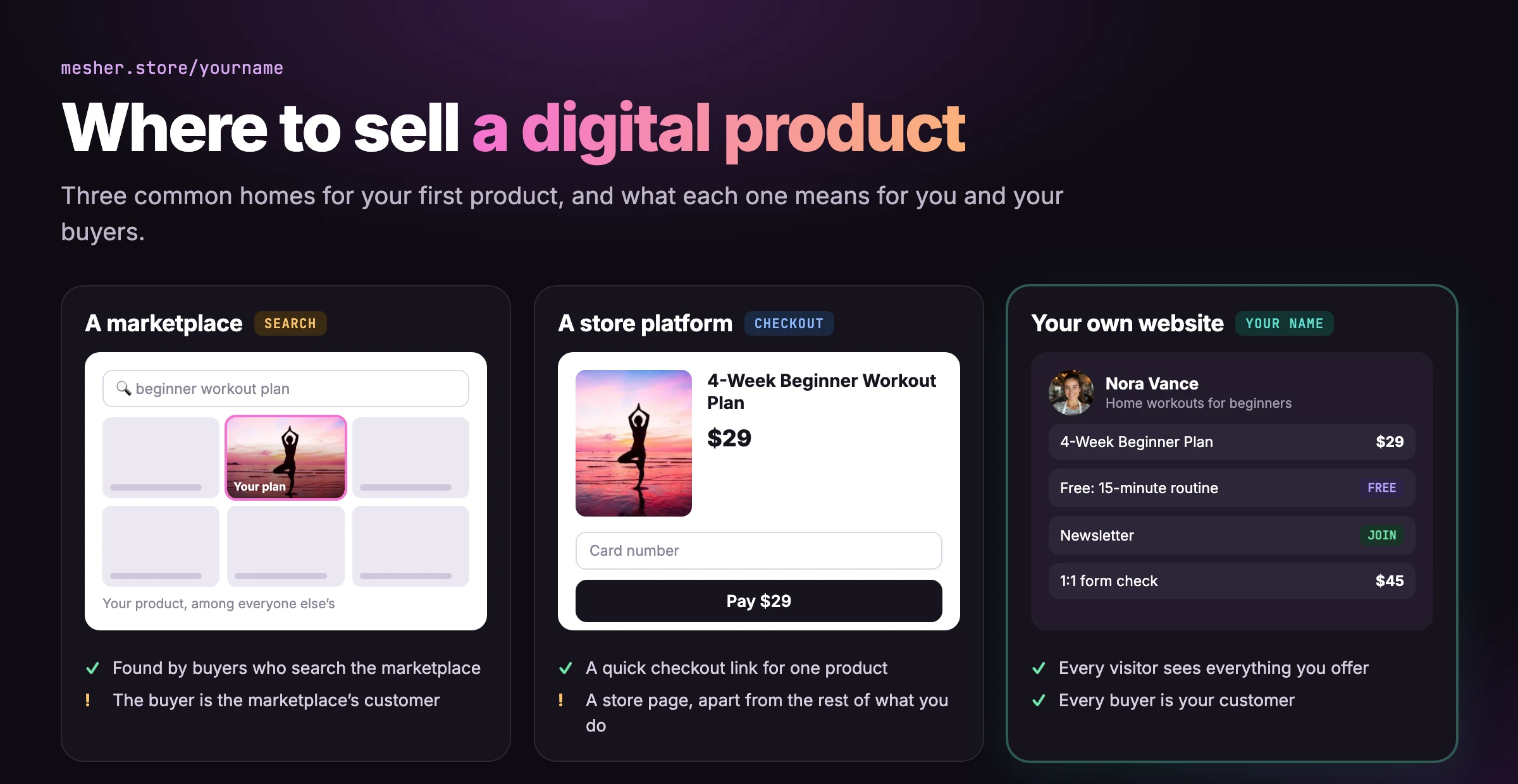
There are three common places to sell a digital product:
Where | Good for | Keep in mind |
|---|---|---|
A marketplace, such as Etsy | Being found by buyers who search the marketplace | Your page sits among competitors, and the buyer is the marketplace’s customer |
A store platform, such as Gumroad or Payhip | A quick checkout link for a product | A store page, separate from the rest of what you do |
Your own creator website | Selling to the audience you already have, under your own name | You bring the visitors, from your social profiles and your list |
If your audience already follows you, your own website is usually the best home: every visitor sees your products, your free downloads and your newsletter in one place, and every buyer is your customer, not a marketplace’s. We compare the store platforms in detail in Mesher vs Gumroad and Mesher vs Payhip.
Selling a digital product on Mesher
Connect Stripe, so payments go straight into your own Stripe account. Our guide to getting paid with Stripe takes you through it.
In your dashboard, add a new product and choose Digital product.
Add the title, description, picture and price, and upload the file: a PDF, ZIP, EPUB, MP3, MP4, DOCX, XLSX or PPTX, up to 100MB.
Publish. The product appears on your page, with a page of its own you can link to.
When someone buys, they pay through Stripe’s checkout and can download the file straight away. They also get a receipt by email with a link back to their download, so a lost file is never a support email for you.
6. Get your first sales
Tell your audience it exists, more than once. One launch post is seen by a fraction of your followers. Show the product in use, answer a question with it, share what a buyer said.
Give something away first. A free checklist or sample grows your list, and the people who use it are the ones most likely to buy. See our lead magnet ideas.
Email your list. Subscribers chose to hear from you, and they buy at a far higher rate than followers who scroll past.
Link the product page directly. In a post, a video description or a DM reply, link the product itself, not just your homepage.
7. After the first sale
Ask buyers what helped and what was missing. Their answers are your next update and your next product.
Add the next step. Someone who bought a guide may want a template set, or an hour of your time. Many creators add paid 1:1 calls next to their products.
Let people say thank you. Not every fan is ready to buy; a “Buy me a coffee” button lets them support you anyway.
Mistakes to avoid
Building for months before selling. Sell the smallest useful version, then improve it with what buyers tell you.
A vague title. If a stranger cannot tell what they get from the title, they will not click to find out.
Pricing by hours spent. Buyers pay for the result, not your effort.
Announcing once. Most of your audience missed the launch post. Keep showing it.
Frequently asked questions
What are digital products?
Products a buyer downloads and uses without you: guides and e-books, templates, presets, planners and printables, and recorded video or audio. You make them once and can sell them again and again, with no stock to keep and nothing to post.
What digital products are in demand?
Templates, planners and short guides sell most often, because they are cheap, easy to understand from a preview and solve a problem the buyer already has. The best one for you answers the question your own audience asks most.
Where can I sell digital products?
On a marketplace, where buyers search among many sellers; on a store platform, which gives you a checkout link; or on your own creator website, where every visitor sees all your products, free downloads and newsletter, and every buyer is your customer.
Can I sell digital products without a website?
Yes. A marketplace or a store platform needs no website. A creator website no longer means building one either: on Mesher you start from a template and have your own page with your products in minutes.
Can I start selling digital products for free?
Yes. Several platforms, Mesher included, let you start with no monthly fee and take a share of each sale instead. Compare what each one keeps per sale on its pricing page before you choose.
How do I market a digital product?
Show it more than once: in a post, in a video description and in your answers to questions. Give away a free download first to grow your email list, then tell your subscribers about the product, and always link the product page itself rather than your homepage.
How much money can you make selling digital products?
It is the price times the number of buyers: 40 sales of a $29 guide is $1,160, before fees. Most creators start small and earn more by adding a second product or a paid 1:1 call for buyers who want more.